Tag Cloud

Monday, December 26, 2005

Singapore Parking Info on your Palm
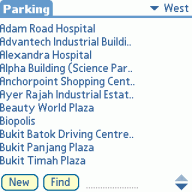
Parking List on List app

The following parking database contains car park rates for most of the major buildings in Singapore. It can be used as a quick reference prior to plunging your car [and wallet] into the devastating fate of exorbitant parking charges.

Don't blow a hole in your wallet like this driver. Abstract from SPUG:

I went to one of those underground carparks where the charges are not displayed at the entrance but right at the gantry. When I reached the gantry and read the charges, I found it to be rather exorbitant($5/entry) and decided that I will not park inside. As there were already other vehicles behind (and even if there weren't, I don't think I am capable to reverse drive 10~20m along several bends), I decided that I shall just go in and drive-out. Surely I will be out within the grace period and will therefore not incur any charges. Well that u-turn in the carpark which took me around 1 min cost me $5.

Parking List files
Download List app for Palm OS, and
Download Parking PDB for List (includes CSV used to create .pdb)

Install the .prc and .pdb files according to standard Palm installation procedures. All files are provided by the respective owners and are FREE.

Why List app?

Its a simple and free Palm OS database app which has a built-in search feature. I find that it suits this parking data well instead of building an app specifically for it. It supports multiple databases so the user is not limited to using only the parking rates database and can create other databases if desired.

Why not use [fill in your favourite app]?

You can use any app you desire since the CSV text file for the data is included. The CSV data is the raw data used to create the database for the List app so there should not be any difference when you view the data for your own app. The List app merely provides a way to arrange and present the data for easier access.

For non Palm OS device users:

The CSV (comma separated value) text file is included in the ZIP file with the List PDB file. You can view and edit the CSV in spreadsheet software such as Microsoft Office Excel and OpenOffice Calc or any text editor. Some minor editing may be required as it was created specifically for the List app.

For Treo users:

Some Treo users may experience auto-resets when using the latest version of List app. It is recommended that you use an older version, preferably 1.01, if you encounter such a problem. If the problem persists, it is recommended that you stop using List app. You can recompile the included CSV into other formats supported by other Palm apps.

Disclaimer

Every reasonable care was taken to reproduce the data, however the accuracy of the database to the actual parking rates may be questionable. Hence there is no warranty for its use and all users should use at their own risk.

Revisions

24 June 2010: Data updated. 697 entries.
23 December 2008: Data updated. 655 entries.
6 July 2008: Data updated. 619 entries.
10 March 2008: Data updated. 537 entries.
2 December 2007: Data updated. 501 entries.
9 July 2007: Data updated. 461 entries.
21 July 2006: Data updated

Saturday, December 24, 2005

Singapore Public Holidays for Palm

This will be the permalink for all future updates.

I have created DBA files for use in Palm Desktop with the public holidays for every year. You will find DBA files for public holidays and school holidays (phXXXX.dba and shXXXX.dba respectively where XXXX denotes the calendar year for that file).

Public Holidays 2012 with School Holidays

Public Holidays 2011 with School Holidays

Public Holidays 2010 with School Holidays

Public Holidays 2009 with School Holidays

Public Holidays 2008 with School Holidays

Launch Palm Desktop and import the file into your Datebook/Calendar. Data obtained from www.sg and MOE website.

To keep updated on future updates, just visit here by year's end to see if the following year's files are added. If not then just leave a comment to remind me. :)

Sunday, December 04, 2005

Ebooks on your java-enabled phone

Readmaniac is an ebook java midlet for java-enabled phones. It is extremely small in size (below 100kb) yet big in features supporting standard text files, Palm doc files (.pdb) and even zipped files among other popular portable formats. It comes default with some clear looking fonts of various sizes. It supports bookmarks, search and other powerful features that make this app a great addition to java phones instead of just having games.

ReadManiac - Electronic book reader for java-enabled phones

Saturday, November 05, 2005

PDF on Palm Too

Following up our review of native PDF readers, there is now a good working PDF reader for Palm known as PalmPDF. Best of all its free and open source! PalmPDF is based on Xpdf and the latest version 0.5 is by far close to an ideal PDF reader even though its still in alpha test phase.

There are resolution settings that allow you to configure the best performance based on your Palm device's available memory resources. I have tested it on my Zodiac 2 in Black and White and Grey scale mode which are stable after running it on a few PDF of over 60 pages without problems. Dragging, scrolling, zooming the page is smooth though it tends to take a while when loading up subsequent pages. Landscape and Portrait modes work well. Colour mode tends to force a reset even though it shows sufficient heap memory available.

This is by far a very good PDF software and I expect it to improve and become a fine work like what TCPMP did for media.

Friday, October 28, 2005

PDF on Palm

You could say native support for PDF files is sorely lacking for Palm OS devices. You can certainly use great document viewers like Repligo to convert and view but that requires one extra step to reach your PDF content. There is however a way to get that feature back on your Palm.

Some time back when Sony was a Palm OS licensee with their Clie line, they provided a software called Picsel Browser that enables one to view native PDF including a few other document formats like Word. With Sony Clie no more in the picture and the company behind the Picsel Browser, Picsel Technologies, providing the software in specific devices, Palm users are left in the cold.

Now some Palm enthusiasts managed to extract that software and make it functional on other Palm OS devices. And couple with the aid of a software called CodeDiver, Picsel Browser can now be used in fullscreen mode. Here's a screen capture of my Zodiac with an opened PDF in fullscreen glory.

PS: Due to copyright issues, do not request for the files here. Remember, Google is your friend.