Being spoilt for choice with thousands of apps available for the Palm OS platform, its quite a chore to find equally fascinating titles on the Symbian S60 platform. I am a cheapskate who prefers not to spend a dime on software and especially not on a "throwaway" device like a phone. So it was quite frustrating in the beginning when I didn't know what exactly is available and wasted a lot of time searching the web.
After taking a while to become accustomed with my Nokia 6120 Classic and testing a wide selection of free programs, I've decided to make this list which I hope can serve as a starting point for new users of a S60 smartphone device. All the apps listed are legal freeware and native S60 apps. I have personally tried out each one and most have a permanent place in my phone. I have also included it with links so you can easily download the programs and even discover other apps on the respective sites.
Nokia software
Nokia has its own Symbian apps which may not be included on their phones.
Nokia Maps
Free vector maps on your phone with satnav capabilities using GPS. It works well even without GPS.
Nokia Search
Search your phone for almost anything using any keyword.
Nokia Energy Profiler
This program is meant for software development purposes but it can be useful to see if you have any rogue power hungry app installed.
Nokia Beta Lab
Nokia has its own beta lab where it lets users try out some apps they are developing for its phones.
Nokia Device Status
A self-diagnosis tool that allows you to collect detailed system information both from your PC and your S60 device. Your device configuration and phone settings are presented in a neat detailed summary. Available as PC and phone versions.
Nokia Audiobooks
Carry your audiobooks while on the go. The package includes a highly efficient audio compression technology optimized for voice (AMR-WB), a player application for S60 (Nokia Audiobook Player), and an audio converter tool for PC (Nokia Audiobook Manager). Whereas traditional music player applications are optimized for music, Nokia Audiobook Player is optimized for audiobooks, enabling you to browse chapters, set bookmarks, and automatically continue from where you last time stopped listening.
Wellness Diary
Monitor and track a range of everyday well-being parameters, including weight, eating habits, exercise, blood pressure and others. Works as a health journal for you to take an active role in the daily and/or long-term management of your health.
This is not really useful to me since I am not a very fitness conscious person. :P
Conversation
Enables grouping of messages in a threaded messaging view. I find that it doesn't display the sender names for SMSes received that have the country code prefix.
Third Party Freeware
Multimedia
Divxplayer
Playback your DivX or Xvid videos. This is however a limited time version. It has decent playback but still not as polished as Coreplayer. A signup is required at Divx site before you can download but you may be able to find the file hosted elsewhere.

emTube
Stream and save Youtube video or play your Flash video (.flv) files stored on your phone. The playback of stored flv video is very smooth and can only get better as the author has been actively improving this app. Now you can watch any lame Youtube video over and over while on that dull commute.
Mobitubia
Like emtube that can stream and playback Youtube videos but with nice eyecandy UI like a revolving menu. I prefer emtube to this since I like a simpler no-frills menu and I am not forced to turn my phone sideways just to use the menu. Some N95 users might prefer this though.
Phone tools
Call Filter or CallFilter
Filter your calls with blacklist or whitelists. There happens to be two apps with the same name. The first one you can get free from S60.com after you sign-up and the other one. I have yet to test both out but the former looks a bit more polished and does not have ugly icons.
FreeCaller
FreeCaller is an open source symbian application that displays a full screen caller photo on incoming calls. The screen displays a pre-attached full scale photo of the caller, its name and phone number.
Kaywa reader
Read those mobile barcodes with this app. It supports decoding and showing the text directly on the screen without connecting to the Net. This is one of the better readers since it can decode QR codes.
Screenshot
Capture screenshots of your phone. This app supports hotkey activation with the "C" or camera button so works well on my 6120c.
SaySMS
Send Flash SMS, an SMS message that pops up on your recipient's phone immediately. It is good for that one off blasts to a friend. It lacks integration with the built-in SMS app and loads with the word "Hi," which is quite annoying since you'll need to clear it every time you don't want to start out with that salutation.
SMS Export
Export your SMS to text files on your phone. Good for creating backups if you hate to sync with Nokia PC Suite.
Theme Scheduler and Profile Scheduler
From the developer of the excellent free file manager Y-browser comes these two scheduler apps for theme and profiles. You can now change themes and profiles as often as you like automatically.
Total Patrol
Nokia left out the missed call/sms alert feature. Now you never have to miss another call/message with this app.
Programming
Python for S60
Develop programs with the efficient Python programming language. This is an excellent rapid application development environment to create working apps with little effort.
Ebooks
BibleReader
I am not a religious fanatic but its nice to see a Bible on a phone. As usual, the more mainstream Bible versions like NIV and NKJV are not free but there are free ones available.
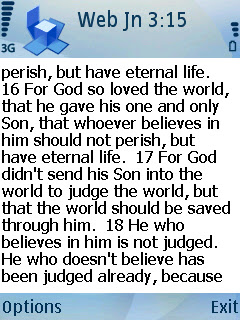


Biblereader, Mobipocket & Pydict
Mobipocket Reader and Qreader
Mobipocker reader is an elegant ebook reader and has better support especially ebooks purchased from its site. But Qreader offers more configurable options and find features. Install and use both if in doubt.
PyDict
A dictionary running on Python for S60. So far free dictionaries on the S60 are quite hard to find.
Internet
Flash Lite 3
This version is a beta release. I hardly use it since I have no need for Flash apps. However I find this is very neat as Palm OS doesn't even have that capability.
GnuBox
GnuBox is useful if you don't have unlimited 3G/GPRS or a free Wifi enabled phone but want to surf the web via BT to your PC's internet connect sharing. The setup is quite a challenge but worthwhile once it works.

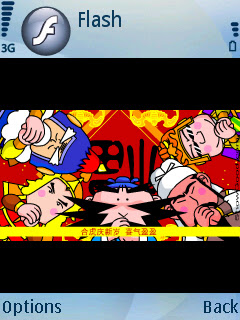
Gnubox & Flash Lite 3
Tools and Utilities
cClock
Display a nice big clock when your phone goes into screensaver or powersaver mode. Very configurable and low power footprint. I never wear a watch; this is my watch.
cCalc
Add a bit more calculation function with this simple scientific calculator with basic programmable conversion functions. Now you can log and root your digits.
cCam
Some Nokia phones do not allow you to shut off the shutter sound for the camera for discrete photo taking. This camera app allows you to do that.

Calcium
A calculator with a gorgeous UI with simple and easy input. It is similar to the calculator found in Motorola phones where the four main operators are entered with the D-pad. If you need to perform fast calculations without a running list like the default Nokia calculator, you will love this.
Active notes
Create notes and embed objects like photos, audio and videos.
Y-Browser plus all plugins
This is by far the best explorer app to manage your files on your phone.
Games

Frozen Bubble
A Puzzle Bubble clone. 100 levels of gameplay. Its a great time waster and is quite easy to complete.
Snakes
An old Nokia classic game revamped in gorgeous 3D gameplay. Hours of fun to complete 42 puzzle levels in great music and sound.
The Snakes is a whole new level based world of gameplay, containing over 40 stages of complex mazes with colorful and brilliant 3D graphics, not to mention the impressive gameplay generated soundscapes. Quick reflexes are needed in making those sharp turns and collecting scattered power-ups, shields, teleporters, and other specialities.
Final notes
This is a non exhaustive list of freeware I have found. I may omit and include more apps in future as I discover them. If you have any good freeware to share, do post a comment.


 Posts